

아톰 에디터 외모 변경하기
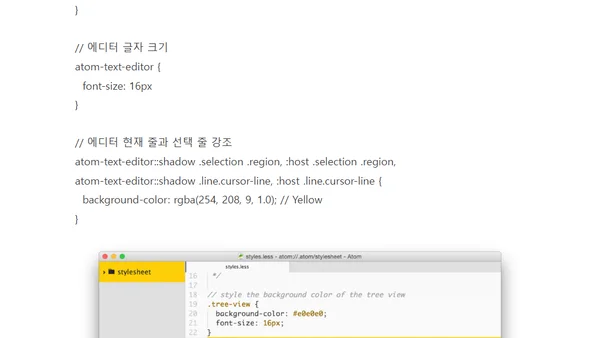
Read Original이 글은 아톰 에디터의 사용자 스타일시트(~/.atom/styles.less)를 활용하여 에디터 외모를 변경하는 방법을 상세히 설명합니다. 개발자 도구를 열어 요소를 확인하고, LESS 문법으로 트리 뷰와 텍스트 에디터의 글자 크기를 키우고, 현재 줄 및 선택된 파일을 노란색으로 강조하는 CSS 코드 예제를 제공합니다. 프레젠테이션에 적합한 가시성 높이는 설정에 중점을 둔 기술 가이드입니다.
Comments
No comments yet
Be the first to share your thoughts!
Browser Extension
Get instant access to AllDevBlogs from your browser
Top of the Week
1
Limit token usage in Microsoft Agent Framework
Jesse Liberty
•
1 votes
2
How to Roll Back AI Agents: Incident Response, Circuit Breakers, and Recovery Patterns
Paul Bryant
•
1 votes
3
Avoiding Reasoning Model Failures with Microsoft Foundry
Luke Murray
•
1 votes
4
When Your AI Agent Lies: Silent LLM Fallbacks
Luke Murray
•
1 votes
5
Adding a custom MCP server to Claude and ChatGPT
Simon Willison
•
1 votes
6
Testing AI prompts and comparing models with promptfoo
Tim Deschryver
•
1 votes
7
Superlogical
Mitchell Hashimoto
•
1 votes