

How to change light and dark Shiki themes when using Astro
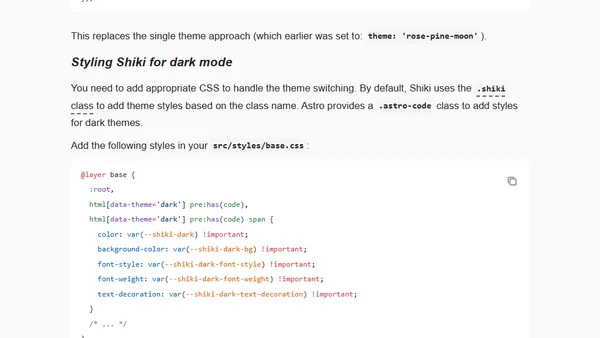
Read OriginalThis technical tutorial explains how to implement dual light and dark theme syntax highlighting in Astro using the built-in Shiki highlighter. It details the necessary configuration changes in `astro.config.ts` and the required CSS styling in `base.css` to enable automatic theme switching for code blocks.
Comments
No comments yet
Be the first to share your thoughts!
Browser Extension
Get instant access to AllDevBlogs from your browser
Top of the Week
1
Using Browser Apis In React Practical Guide
Jivbcoop
•
2 votes
2
Better react-hook-form Smart Form Components
Maarten Hus
•
2 votes
3
Top picks — 2026 January
Paweł Grzybek
•
1 votes
4
In Praise of –dry-run
Henrik Warne
•
1 votes
5
Deep Learning is Powerful Because It Makes Hard Things Easy - Reflections 10 Years On
Ferenc Huszár
•
1 votes
6
Vibe coding your first iOS app
William Denniss
•
1 votes
7
AGI, ASI, A*I – Do we have all we need to get there?
John D. Cook
•
1 votes
8
Quoting Thariq Shihipar
Simon Willison
•
1 votes
9
Dew Drop – January 15, 2026 (#4583)
Alvin Ashcraft
•
1 votes